
Web dashboard
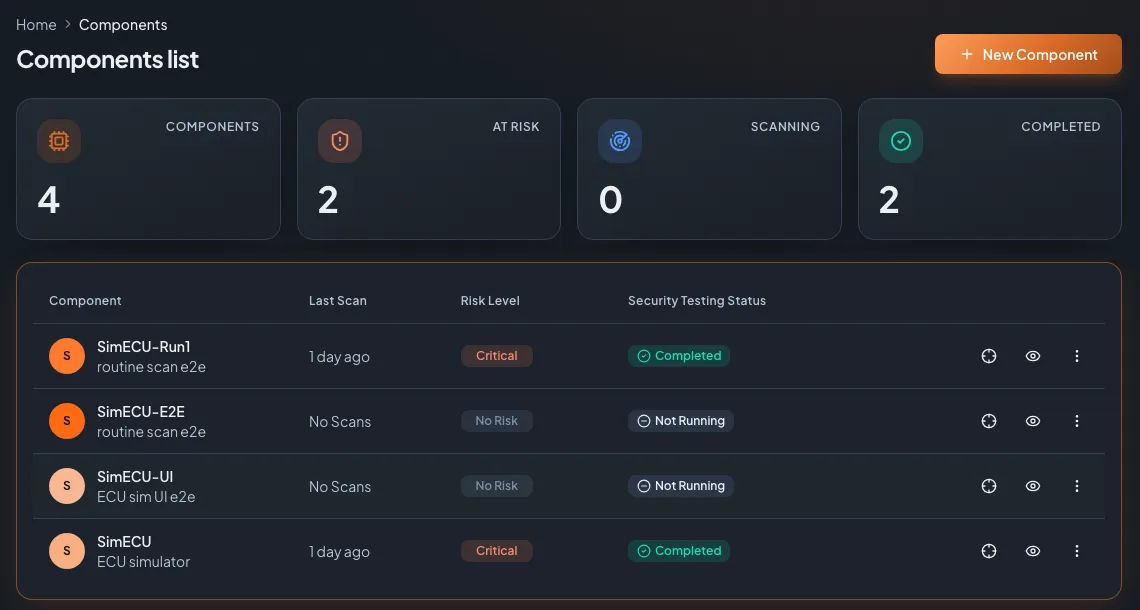
Define ECUs, configure and launch scans, watch progress live and read findings. Role-based access, groups and multi-tenant.
How it works
AutoST splits into three parts: the web dashboard you work in, a backend that orchestrates scans and stores results, and Carbyne, the agent that sits next to your ECU and talks to the bus.
In short
AutoST has three parts. The web dashboard is where you define ECUs (components), configure scans and read results. The backend orchestrates jobs, stores findings and issues API tokens. Carbyne is a bench agent that runs on Windows or Linux, connects to the ECU over CAN, CAN FD, DoIP or SOME/IP, and executes the scans, reporting progress and results back over HTTPS. Several agents can test several ECUs in parallel.
The setup
One ECU, one interface, one tester running Carbyne, and the AutoST backend. Nothing exotic.
The three parts
Define ECUs, configure and launch scans, watch progress live and read findings. Role-based access, groups and multi-tenant.
Orchestrates the job queue, stores scans and findings, scores risk and issues the API tokens that drive CI/CD.
Runs on your bench on Windows or Linux, connects to the ECU over the bus or IP, executes scans and streams results back over HTTPS.
The scan flow
Create the ECU in the dashboard: its interfaces (CAN bus, Ethernet) and protocols (CAN, CAN FD, UDS, DoIP). A 3-step wizard walks you through it.
Install Carbyne on the bench machine and pair it with an API token. It reports an agent ID and shows up as an available target.
Pick the engine and mode, the adapter and bitrate, keep-alive, and any ODX/CDD or DBC files. The wizard previews the whole configuration.
The agent executes the scan and streams progress: iterations, findings, requests per second. Several agents can run in parallel.
Read the findings, accept or comment on risks, and export a PDF report plus the fix plan as SARIF, CSV or JSON.
Built for test benches
AutoST does not need a lab full of security tools. One container runs the dashboard and backend; the Carbyne agent runs next to the ECU on hardware you already have.
Comments and risk acceptance carry over when you re-run a scan, so a fix shows up as resolved and the noise does not come back. Scan history per component gives you a record over the life of the ECU.
FAQ
On the Carbyne agent, next to the ECU. The backend orchestrates and stores; the agent does the bus and IP communication. Nothing is tested from the backend directly.
Yes. Each bench runs its own agent, and the backend schedules scans across all of them in parallel.
No. The agent polls the backend over HTTPS and pulls its jobs, so no inbound ports are opened on the bench.
See it on your ECU
Book a one-hour live demo. We scan a real target, walk through the findings and the Fix Plan, and answer whatever you throw at us.

Your demo is withTom ZaubermannFounder of Zyberum, ex-lead of the VW InCar Security Testing Lab
Already trusted by Tier 1, Tier 2 suppliers and OEMs. References on request.
We reply within one business day.
Your privacy
We use cookies and similar technologies to measure our website and the success of our ads. You decide which ones we may use. You can change your choice at any time via "Cookie settings" in the footer. Privacy policy